

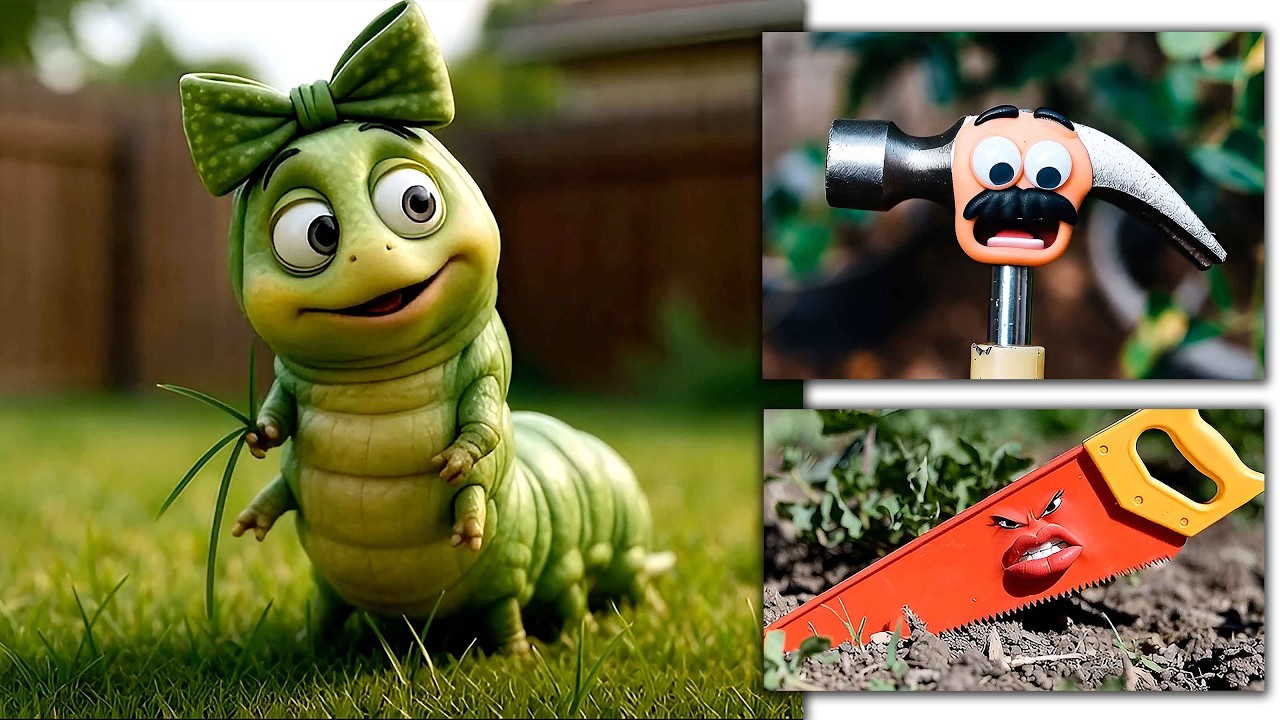
In 2012, I wrote a four-minute children's film, My Garden Pals. The story concerned a female caterpillar (Katie), a child's hammer (Mark), and a child’s saw (Saly) that were left out in the garden to fend for themselves. I was able to get three of my students to record the character voiceovers, and I videotaped their performance in the hopes that a computer science major would be able to lip sync the animated characters and bring the story to life.
Unfortunately, while every student I approached liked the idea, none had the time to commit to animating the 2D (or preferably 3D) comedy. Not being able to find anyone to work on the project, I removed the assets from my hard drive, stored them on one of my backup drives, and stuck it in the closet. There it sat for 14 years.
Back in the Game
Fast forward to December 2025. I just completed an animation project where the boxes and bottles in a medicine cabinet come to life and try to save a tin of Rexall milk of magnesia tablets that had been left on the sink. I had intended to use stop motion animation, but I found it easier to complete the project using AI.
With that project successfully completed, I thought AI would be a great way to bring that old children's film over the finish line. Of course, the first challenge was to find where I put the footage. Eventually, I located the hard drive in a box and copied the video and audio of my former students speaking the lines. Although the audio was recorded in mono (left channel only), and I was able to use Abobe Premiere Pro to make a stereo version.
I had some familiarity with Grok (an AI assistant from xAI), having used it for The Great Rexall Rescue, and decided to use it to bring My Garden Pals to life. I typed in the description of the first character, Katie the Caterpillar. The information in the script said, “Katie was chewing on some grass in the small backyard. She's clearly a female caterpillar because she has a large bow on her one hair. Her eyes are too small for her face, and her mouth is overly large. Tiny, useless arms hang down at her side.”
With this information, I let Grok do its work and generate a still frame. After about 60 seconds, I had more than 50 different examples of what Grok thought my caterpillar should look like. I selected the one that I thought was best.
Watch What You Type
The next step was to type in Katie’s audio and have the animated character speak the words. This I got directly from the script. I would begin with typing, “Create a video having the caterpillar saying…” I made sure I selected the aspect ratio (16:9) and “Fun” or “Normal” for the style of video. After another 60 seconds, I had the caterpillar speaking the exact script.
Each video scenario/shot generated was limited to eight seconds in the free version. Free is no longer an option, as Grok now charges $30 per month, but videos can now be up to 12 seconds in 720p (or 30 seconds in 480p).
The AI-generated video and audio would add a little background music, the dialogue (spoken in a female voice), and end with a music stinger or some expression on the character's face. Several times I had to hit the “Redo” button because it would add bizarre things that I didn't really need.
Once I found what I wanted, I would select “Up Res” to make the footage 1,504x832 at 24p. I’m not sure how it arrived at those specific numbers, but I could use “Scale” under Effect Controls in Premiere to make it larger. At that point, I would download the file. I now had a completed file with video and audio.
Using the previous video just created, I would type in the next line of dialog that Katie the Caterpillar would say. All of Katie's lines in the script were done in one sitting. I found it easier to do all of Katie's shots first, followed by the shots of the other characters.
As I was just typing in the audio and what I wanted the character to do, I also wanted to add reaction shots. When Katie was talking, I may need a reaction shot from Mark the Hammer or Saly the Saw. Again, I would simply type in what I envisioned the other character doing with eye gestures, mouth movements, and expressions and Grok would complete it.

I did all of Mark the Hammer’s shots next. Although he was a slightly mean character, I had envisioned a Wallace and Gromit clay animation look. Putting all this in Grok, it appeared as you see it in the photo, complete with tooth marks on the hammer. The last character, Saly the Saw, was all done at once, too.
This all sounds relatively painless. However, it wasn't quite that easy. Although the version of Grok that I used was free and had no watermark, there were some things I had to work around. For example, I needed several e-mail addresses to login to the software. After several hours of work, I got locked out of the software because I overused my free allotment of time. In my defense, it never told me what my free allotment was.
I had tried other AI software, and you needed carrots or coins that would rapidly disappear as soon as you started working. Then, the software would request you get a license. Also, if I tried to do too much in one sitting, Grok would tell me that the hours of 2-8 p.m. were best suited for my needs, as 8:30 p.m. to 2 a.m. were “peak" hours. I rarely got much work done before 2 p.m. with my teaching schedule, but after 2 p.m. the software was less sluggish. (Again, this has changed with the pay model.)
Audio Obstacles
In animation, you produce the audio first and then worry about the video. This project was done a little differently in that I would type the audio I wanted with the video, remove Grok’s audio, and then insert my own prerecorded audio.
I imported the shots with Grok-generated video and audio intact into Adobe Premiere Pro. Once moved to the timeline, I would take the audio from 2012 and lay it underneath the audio generated by Grok. By soloing my student’s audio, I would match the lip sync with the 2026 visuals.
Usually, it was close because the audio was short. Sometimes, I would either speed up or slow down the visuals to make the lip sync match. The pacing of the AI-generated audio was rarely what I envisioned as a director. But if I put the word “beat” or “pause” in, the AI character would speak the word “beat” or “pause.” Hey, what do you want for free?
One time, when I was adding the dialogue for Saly the Saw, there was a large black cable attached to the back of the saw that moved up and down with her. I didn't want that, so I typed, "Please remove the black cable from the video.” When Grok completed the video, the dialogue was what I had typed in, plus Saly spoke, “Please remove the black cable from the video.”
Even typos would appear as real words. Other times, dialogue would appear as white text on the saw. I clicked the “Redo” button several times before the black cable disappeared and the audio mentioning the black cable was gone, too. Apparently, talking saw characters are difficult for Grok.
Sync or Sunk?
Getting my original audio to exactly match the AI’s audio was my next issue. The only remedy for that was the Razor Blade cutting tool in Premiere. I would get four or five words exactly how I wanted with lip sync, cut the scene, slow it to 83%, and keep it at that speed until the sync would drift. For an eight-second bit of lip sync, there may have been five different cuts and five different speeds.
It took me several weeks to complete the project during the golden hours during which I was allowed to access Grok. Despite the hassles, this whole AI technology is really mind blowing. Considering how Grok could do this for free and I have no artistic skill, this was amazing!
Watching the final project dozens and dozens of times, little issues were corrected, inconsistencies in the characters were fixed, and music and sound effects were added at the appropriate places. Now that I have this film under my belt, I found another short project that I started in 2016 about three young women who are tired of being two dimensional characters and go see a wizard to be converted to 3D characters. Looking forward to seeing how Grok brings that project to life.

